
Customer.io
The Customer.io integration sends subscription lifecycle events from Superwall to Customer.io's Data Pipelines API. This enables you to trigger targeted messaging campaigns, build user segments based on subscription behavior, and track the complete customer journey from trial to paid subscriber.
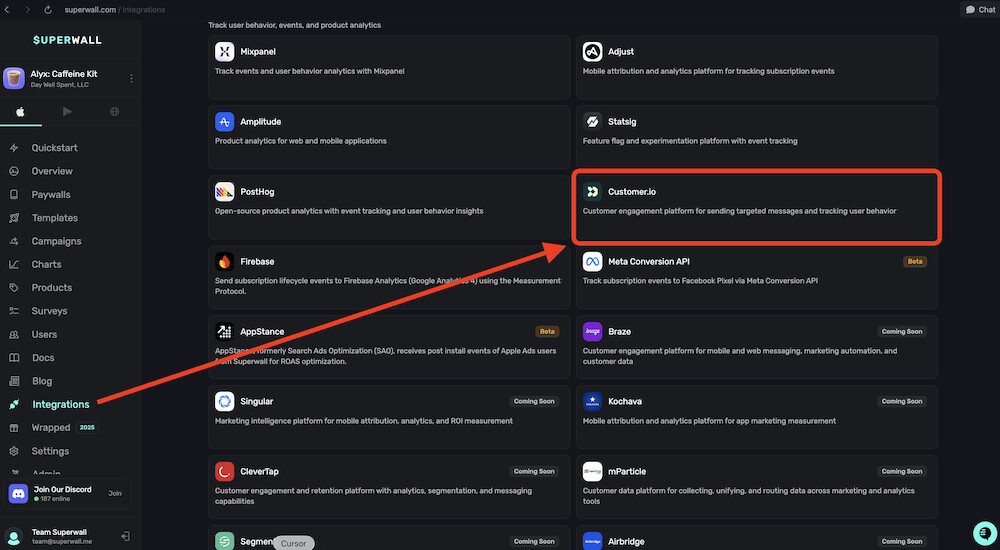
In the Communication section within Integrations, you can connect your Customer.io account to Superwall:
Features
- Real-time Event Tracking: Subscription events are sent immediately to Customer.io as they occur
- Multi-Region Support: Choose between US and EU data residency to comply with data regulations
- Flexible Revenue Reporting: Report either gross revenue or net proceeds after store fees
- Sandbox Environment Support: Separate API key for testing without polluting production data
- Anonymous User Handling: Configurable behavior for users without an identified app user ID
- Custom Event Names: Remap default event names to match your existing Customer.io conventions
- Automatic User Identification: Smart routing between
userIdandanonymousIdbased on user state
Configuration
Required Settings
| Field | Description | Example |
|---|---|---|
integration_id | Must be set to "customerio" | "customerio" |
region | Data residency region for your Customer.io workspace | "US" or "EU" |
api_key | Pipelines API key from your HTTP source | "abc123def456..." |
sales_reporting | Whether to report gross Revenue or net Proceeds | "Revenue" or "Proceeds" |
Optional Settings
| Field | Description | Default |
|---|---|---|
sandbox_api_key | Separate Pipelines API key for sandbox/test events | None (sandbox events skipped) |
anonymous_user_behavior | How to handle events from users without an app user ID | "send" |
eventNameMappings | Custom mapping to rename default event names | None |
Example Configuration
{
  "integration_id": "customerio",
  "region": "US",
  "api_key": "your-pipelines-api-key",
  "sales_reporting": "Revenue",
  "sandbox_api_key": "your-sandbox-pipelines-api-key",
  "anonymous_user_behavior": "send",
  "eventNameMappings": {
    "sw_trial_start": "trial_started",
    "sw_subscription_start": "subscription_started",
    "sw_renewal": "subscription_renewed"
  }
}
Getting Your API Key
The Customer.io integration uses the Pipelines API (part of Customer.io Data Pipelines), not the Track API. To get your API key:
- Log in to your Customer.io account
- Navigate to Data Pipelines in the left sidebar
- Go to Sources
- Click Add Source and select HTTP
- Name your source (e.g., "Superwall Events")
- Copy the API Key displayed after creation
Important: The Pipelines API key is different from the Track API credentials (Site ID + API Key). Make sure you're using the correct key from Data Pipelines.
Event Mapping
Superwall subscription events are transformed into Customer.io events based on the event type and subscription period. All events are prefixed with sw_ by default.
Trial Events
| Superwall Event | Condition | Customer.io Event |
|---|---|---|
INITIAL_PURCHASE | periodType = Trial | sw_trial_start |
CANCELLATION | periodType = Trial | sw_trial_cancelled |
UNCANCELLATION | periodType = Trial | sw_trial_uncancelled |
EXPIRATION | periodType = Trial | sw_trial_expired |
RENEWAL | periodType = Trial | sw_trial_converted |
Intro Offer Events
| Superwall Event | Condition | Customer.io Event |
|---|---|---|
INITIAL_PURCHASE | periodType = Intro | sw_intro_offer_start |
CANCELLATION | periodType = Intro | sw_intro_offer_cancelled |
UNCANCELLATION | periodType = Intro | sw_intro_offer_uncancelled |
EXPIRATION | periodType = Intro | sw_intro_offer_expired |
RENEWAL | periodType = Intro | sw_intro_offer_converted |
Subscription Events
| Superwall Event | Condition | Customer.io Event |
|---|---|---|
INITIAL_PURCHASE | periodType = Normal | sw_subscription_start |
RENEWAL | periodType = Normal | sw_renewal |
RENEWAL | isTrialConversion = true | sw_trial_converted |
CANCELLATION | periodType = Normal | sw_subscription_cancelled |
UNCANCELLATION | periodType = Normal | sw_subscription_uncancelled |
EXPIRATION | periodType = Normal | sw_subscription_expired |
Other Events
| Superwall Event | Customer.io Event |
|---|---|
PRODUCT_CHANGE | sw_product_change |
BILLING_ISSUE | sw_billing_issue |
SUBSCRIPTION_PAUSED | sw_subscription_paused |
NON_RENEWING_PURCHASE | sw_non_renewing_purchase |
Any event with price < 0 | sw_refund |
Event Properties
Each event sent to Customer.io includes comprehensive properties from the original Superwall event, plus additional formatted fields for revenue tracking.
Standard Properties
All events include the complete Superwall event data:
| Property | Description | Example |
|---|---|---|
id | Unique event identifier | "evt_abc123" |
productId | The subscription product ID | "com.app.premium.monthly" |
store | App store (APP_STORE, PLAY_STORE) | "APP_STORE" |
environment | Production or Sandbox | "Production" |
countryCode | User's country code | "US" |
currencyCode | Transaction currency | "USD" |
originalAppUserId | Your app's user identifier | "user_12345" |
originalTransactionId | Store's original transaction ID | "1000000123456789" |
transactionId | Current transaction ID | "1000000987654321" |
purchasedAt | Purchase timestamp (ms) | 1705312200000 |
expirationAt | Subscription expiration (ms) | 1707990600000 |
periodType | Trial, Intro, or Normal | "Normal" |
isTrialConversion | Whether this converts a trial | true |
isFamilyShare | Family sharing purchase | false |
bundleId | App bundle identifier | "com.example.app" |
Revenue Properties
When the event has a non-zero price, these additional properties are included:
| Property | Description | Example |
|---|---|---|
price | Amount based on sales_reporting setting | 9.99 |
currency | Currency code | "USD" |
product_id | Product identifier | "com.app.premium.monthly" |
subscription_id | Original transaction ID | "1000000123456789" |
offer_code | Promotional offer code (if present) | "SUMMER2024" |
Revenue vs Proceeds
The sales_reporting setting controls which amount is sent:
- Revenue: The full price charged to the customer (e.g., $9.99)
- Proceeds: The amount after store fees are deducted (e.g., $8.49 after Apple's 15-30% commission)
User Identification
Customer.io uses either userId or anonymousId to identify users. The integration automatically selects the appropriate identifier based on user state.
Known Users
For users with an originalAppUserId set in Superwall:
{
  "userId": "user_12345",
  "event": "sw_subscription_start",
  "properties": { ... },
  "timestamp": "2024-01-15T10:30:00.000Z"
}
Anonymous Users
For users without an originalAppUserId, the behavior depends on anonymous_user_behavior:
When set to "send" (default):
- Events are sent with an
anonymousIdconstructed from the store and transaction ID - Format:
$STORE_NAME:originalTransactionId
{
  "anonymousId": "$APP_STORE:1000000123456789",
  "event": "sw_subscription_start",
  "properties": { ... },
  "timestamp": "2024-01-15T10:30:00.000Z"
}
When set to "dontSend":
- Events from anonymous users are skipped entirely
- Useful if you only want to track identified users
Sandbox Handling
The integration supports separate handling for sandbox (test) events:
With Sandbox API Key Configured
When sandbox_api_key is provided:
- Production events use the main
api_key - Sandbox events use the
sandbox_api_key - Both are sent to Customer.io but can be routed to different destinations
Without Sandbox API Key
When sandbox_api_key is not provided:
- Production events are sent normally
- Sandbox events are skipped entirely
- This prevents test data from polluting your production Customer.io workspace
Data Residency
Customer.io offers data residency in two regions. The integration automatically routes to the correct endpoint:
| Region | API Endpoint |
|---|---|
| US | https://cdp.customer.io/v1/track |
| EU | https://cdp-eu.customer.io/v1/track |
Choose the region that matches your Customer.io workspace configuration. Using the wrong region will result in authentication errors.
Custom Event Names
Use eventNameMappings to rename default event names to match your existing Customer.io conventions:
{
  "eventNameMappings": {
    "sw_trial_start": "Started Free Trial",
    "sw_subscription_start": "Subscribed",
    "sw_renewal": "Subscription Renewed",
    "sw_subscription_cancelled": "Subscription Cancelled",
    "sw_refund": "Refund Processed"
  }
}
Only events you specify in the mapping are renamed. All other events keep their default sw_ prefixed names.
Testing the Integration
1. Validate Credentials
The integration validates credentials by sending a test event to Customer.io. If the API key is invalid or the region is incorrect, you'll receive an authentication error.
2. Verify in Customer.io
After sending test events:
- Go to Data Pipelines → Sources → your HTTP source
- Click on Events to see incoming events
- Verify event names and properties match expectations
3. Test Scenarios
Verify these scenarios work correctly:
- Production event with known user (should use
userId) - Production event with anonymous user (should use
anonymousIdor skip) - Sandbox event with sandbox API key (should send to Customer.io)
- Sandbox event without sandbox API key (should be skipped)
- Event with custom name mapping (should use remapped name)
- Revenue event (should include
price,currency,product_id) - Non-revenue event like cancellation (should not include revenue properties)
Best Practices
-
Use separate sandbox credentials: Configure a
sandbox_api_keyto keep test data separate from production, or leave it blank to skip sandbox events entirely. -
Choose the right sales reporting: Use "Revenue" for customer-facing metrics and "Proceeds" for financial reporting that accounts for store fees.
-
Handle anonymous users thoughtfully: If your app requires login, use
"dontSend"to avoid cluttering Customer.io with unidentifiable users. -
Keep event names consistent: If you have existing events in Customer.io, use
eventNameMappingsto maintain naming consistency across your data. -
Verify your region: Ensure your
regionsetting matches your Customer.io workspace location to avoid authentication failures. -
Test with sandbox first: Always test your integration configuration with sandbox events before going live with production data.
Common Use Cases
Win-Back Campaigns
Trigger automated campaigns when users cancel:
- Listen for
sw_subscription_cancelledevents - Create a segment of recently cancelled users
- Send a series of win-back emails with special offers
Trial Conversion Optimization
Improve trial-to-paid conversion:
- Track
sw_trial_startto begin a nurture sequence - Send educational content about premium features
- Trigger a special offer before trial expiration
- Track
sw_trial_convertedto measure success
Churn Prevention
Identify and engage at-risk subscribers:
- Monitor
sw_billing_issueevents - Send immediate notification to update payment method
- Follow up with helpful support content
- Track resolution with subsequent
sw_renewalevents
Revenue Analytics
Build comprehensive revenue reporting:
- Segment users by subscription status
- Track lifetime value using revenue properties
- Analyze conversion rates by cohort
- Measure impact of promotional offers via
offer_code
Troubleshooting
Events Not Appearing in Customer.io
Possible causes:
- Incorrect API key (make sure you're using Pipelines API key, not Track API)
- Wrong region selected (US vs EU mismatch)
- Sandbox events without sandbox API key configured (events are skipped)
- Anonymous users with
dontSendbehavior (events are skipped)
Solution: Verify your API key is from Data Pipelines → Sources → HTTP, and check that your region matches your workspace.
Authentication Errors
Possible causes:
- Using Track API credentials instead of Pipelines API key
- Region mismatch between configuration and Customer.io workspace
- API key has been revoked or regenerated
Solution: Generate a new HTTP source in Data Pipelines and use the fresh API key.
Missing Revenue Properties
Possible causes:
- Event has zero price (cancellations, expirations)
- Refund events (price is negative, still included but as negative value)
Solution: Revenue properties (price, currency, product_id, subscription_id) are only added when the price is non-zero. This is expected behavior.
Wrong Event Names
Possible causes:
- Event name mappings not configured
- Typo in mapping configuration
Solution: Check your eventNameMappings configuration. Keys should be the default event names (e.g., sw_trial_start), and values should be your desired custom names.
Rate Limits
Customer.io's Pipelines API has generous rate limits suitable for high-volume event ingestion:
- Requests: 500 requests per second per source
- Payload size: 32KB per request
The integration sends one event per webhook, well within these limits. If you experience rate limiting, contact Customer.io support to increase your limits.
API Reference
Endpoint
POST https://cdp.customer.io/v1/track      (US region)
POST https://cdp-eu.customer.io/v1/track   (EU region)
Authentication
Basic Authentication with the Pipelines API key as username and empty password:
Authorization: Basic base64(api_key:)Request Format
{
  "userId": "user_12345",
  "event": "sw_subscription_start",
  "timestamp": "2024-01-15T10:30:00.000Z",
  "properties": {
    "productId": "com.app.premium.monthly",
    "price": 9.99,
    "currency": "USD",
    "store": "APP_STORE",
    "environment": "Production",
    ...
  }
}
Response
Success: 200 OK with empty body or acknowledgment
Errors:
401 Unauthorized: Invalid API key or wrong region400 Bad Request: Malformed request body429 Too Many Requests: Rate limit exceeded
How is this guide?
Edit on GitHubAmplitude
The Amplitude integration automatically sends Superwall subscription and payment events to your Amplitude project. Track subscription lifecycle events, analyze revenue metrics, and understand user behavior with automatic event mapping and revenue tracking.
Firebase
The Firebase integration automatically sends Superwall subscription and payment events to Firebase Analytics (Google Analytics 4) using the Measurement Protocol. Track subscription lifecycle events, analyze revenue metrics, and leverage Firebase's powerful analytics capabilities.